

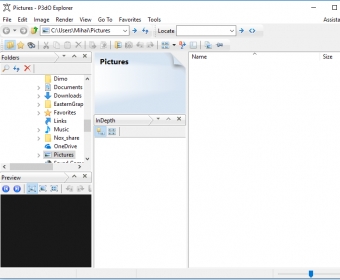
With P3Do we can organize, print and visualize our pictures in uncountable different formats. When we open the program we can see a Menu Bar, a folder tree, different tools, an address toolbar and a window for watching our pictures. With the program we can open more than 40 formats, and this is a great advantage for handling our images: this program helps to save time, providing up with features all in one.
While browsing our pictures, we can select the best fit, fit to window, tiles, rotate to the left or right, or copy the image. "Depth" option brings up various characteristics of our images like pixels, color depth, version and more. The program lets us render our images like wireframe, flat shading, smooth shading, cartoon shading and texture mapping and we can create slide shows from our pictures. We can also adjust the layout style, select the desired language between ten available languages, select the thumbnail layouts, the slide show time, the 3D renderer, poser location and more. With this program, we can even observe 3d images - which is really amazing.

 dbForge SQL Tools 6.6
 dbForge Studio for SQL Server 6.6
 dbForge SQL Complete 6.1
 dbForge Source Control for SQL Server 2.7
 dbForge Compare Bundle for SQL Server 6.6
 dbForge Documenter for SQL Server 1.8
 dbForge Data Generator for SQL Server 4.6
 dbForge Index Manager for SQL Server 1.1
 dbForge Data Pump for SQL Server 1.9





Comments